Sentosa: A Handwritten Font for Elegant Design
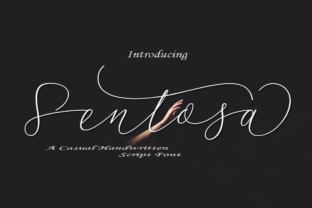
If you're looking for a font that brings a personal touch to your designs, Sentosa is a standout choice. This handwritten, monoline font offers a natural, flowing style that can elevate everything from wedding invitations to social media posts. Its clean lines and organic feel make it ideal for projects where a human element is desired. But before you dive into using Sentosa, there are some important considerations to keep in mind.
Understanding what Sentosa is and how it can be used is the first step. Unlike blocky or geometric fonts, Sentosa mimics the fluidity of handwriting, which can add warmth and authenticity to your work. However, this very quality can also lead to challenges if not used thoughtfully. Let’s explore common mistakes and how to avoid them.
Mistake 1: Overusing the Font
One of the most frequent errors when working with Sentosa is using it too much. While its beauty is undeniable, applying it to entire documents or large blocks of text can reduce readability. The font’s cursive nature may make it difficult to read in long paragraphs, especially on smaller screens or low-resolution displays.
What to do instead: Use Sentosa strategically. Apply it to headings, titles, or short phrases where its elegance can shine. For body text, consider pairing it with a more traditional sans-serif or serif font to maintain clarity and balance.
Mistake 2: Ignoring Font Licensing
Another common oversight is not checking the licensing terms of Sentosa. Many fonts come with specific usage rights, and failing to understand these can lead to legal issues, especially if you’re using the font for commercial purposes.
What to do instead: Always review the license agreement before downloading or purchasing Sentosa. Make sure you know whether it’s free for personal use, commercial use, or requires attribution. Some fonts may also have restrictions on embedding or modifying the file.
Mistake 3: Not Testing on Different Platforms
Fonts can look different across devices and platforms. What appears smooth and elegant on your computer might not render as well on a mobile phone or tablet. This can affect the overall presentation of your design, especially if you’re creating content for online audiences.
What to do instead: Test Sentosa on multiple devices and browsers. Preview your work in different formats—such as PDF, web pages, or social media posts—to ensure it looks consistent and professional across all platforms.
Mistake 4: Choosing the Wrong Size or Style
Handwritten fonts like Sentosa often have variations in weight and style. Using the wrong size or style can make your design look unbalanced or unprofessional. For example, a very small version of Sentosa might be hard to read, while a large size could overwhelm the layout.
What to do instead: Experiment with different sizes and styles to find what works best for your project. Consider the context in which the font will be used—whether it’s a banner, logo, or digital ad—and adjust accordingly. Always prioritize legibility without sacrificing style.
Mistake 5: Not Considering the Audience
While Sentosa has a charming, personal feel, it may not be suitable for all audiences. For instance, a formal business document or a professional website might benefit more from a more structured font. Using Sentosa in such contexts could give an unintended impression of informality or lack of professionalism.
What to do instead: Think about the message you want to convey. If your audience expects a polished, serious tone, choose a font that aligns with that expectation. Save Sentosa for creative or personal projects where its unique style adds value.
How to Get the Most Out of Sentosa
To make the most of Sentosa, start by understanding its strengths and limitations. It’s a powerful tool for adding a human touch to your designs, but it requires thoughtful application. Here are a few practical tips:
- Use it for emphasis: Highlight key words or phrases with Sentosa to draw attention without overwhelming the reader.
- Pair it with complementary fonts: Combine Sentosa with a clean, readable font for contrast and balance.
- Check for kerning and spacing: Handwritten fonts sometimes have irregular spacing. Adjust the letter spacing manually if needed to improve readability.
- Explore different applications: Try Sentosa on business cards, social media graphics, or signage to see how it performs in various formats.
Before finalizing your decision, take the time to evaluate Sentosa in the context of your specific project. Ask yourself: Does it enhance the message? Is it easy to read? Will it work across all intended platforms?
By avoiding common pitfalls and using Sentosa wisely, you can create designs that are both beautiful and effective. Whether you’re a designer, marketer, or hobbyist, this font offers a unique way to express creativity while maintaining professionalism.