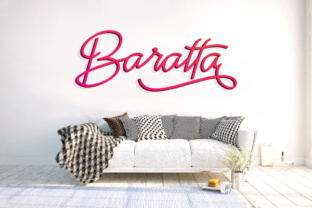
Baratta: A Flourished Script for Creative Expression
Baratta is a stunning script font that brings a touch of elegance and personality to any design. With its monoline weight and character alternates, it offers a versatile tool for creating unique and eye-catching typographic displays. Whether you're working on a logo, a poster, or a social media graphic, Baratta can elevate your work with its refined and expressive style.
For designers, marketers, and creators looking to add a personal touch to their projects, Baratta provides an accessible way to introduce flair without sacrificing clarity. Its balanced structure ensures readability even in larger sizes, making it ideal for headlines and display text. However, while Baratta is undeniably beautiful, there are some common pitfalls to avoid when using it effectively.
Common Mistakes When Using Baratta
One of the most frequent mistakes is overusing Baratta in body text. While its flowing strokes and ornate details make it perfect for headlines, applying it to long paragraphs can reduce legibility and create visual clutter. This often leads to a less professional appearance, especially in printed materials or digital content where readability is crucial.
Another mistake is not taking advantage of the font's character alternates. Many users stick to the default characters without exploring the variations available. These alternates allow for more dynamic and personalized designs, but they require a bit of extra effort to implement. Failing to use them can result in a generic look that doesn't fully showcase the font's potential.
Some users also overlook the importance of proper spacing and kerning when working with script fonts like Baratta. Script styles often have irregular spacing between letters, which can lead to awkward gaps or crowded areas if not adjusted manually. This issue can be particularly noticeable in titles or headings where visual balance is key.
How to Avoid Common Pitfalls
To get the most out of Baratta, start by using it strategically. Reserve it for short, impactful text such as headlines, logos, or decorative elements. This approach maintains its visual appeal while ensuring it remains functional and easy to read.
Take time to explore the font's alternate characters. Most font software allows you to access these options through the glyph panel or character map. Experimenting with different combinations can help you find the perfect look for your project. For example, using an alternate "A" or "G" can add subtle variation that makes your design stand out.
Pay attention to spacing and typography. Use a design tool with advanced kerning controls to fine-tune the letter spacing. This small adjustment can make a big difference in how clean and professional your final output looks. If you're unsure, consider pairing Baratta with a sans-serif font for contrast, which can improve overall readability and visual harmony.
What to Check Before Using Baratta
Before downloading or purchasing Baratta, verify that it includes all necessary language support if you're working with multiple languages. Some script fonts may lack certain characters or diacritics, which can limit their usefulness in international projects.
Also, check the licensing terms. Make sure the font is suitable for your intended use, whether it's personal, commercial, or for a client. Some licenses restrict usage in specific contexts, so understanding these terms is essential to avoid legal issues later on.
Finally, test Baratta in different sizes and formats. What looks great at 72pt may not work well at 12pt. Preview your designs in various settings to ensure consistency and quality across platforms and devices.
Best Practices for Using Baratta
When working with Baratta, keep your design goals in mind. If you're aiming for a vintage or artisanal feel, this font can be a strong asset. However, if you're going for a modern or minimalist aesthetic, consider pairing it with simpler fonts to maintain balance.
Use Baratta to highlight key messages or create a sense of movement in your layout. It works well in combination with bold or geometric typefaces, allowing you to create contrast that draws attention without overwhelming the viewer.
Remember, the goal is to enhance your message, not overshadow it. By using Baratta thoughtfully and intentionally, you can achieve a polished and professional result that resonates with your audience.
Ultimately, Baratta is a powerful tool for creative expression, but its success depends on how it's applied. By avoiding common mistakes and following best practices, you can unlock its full potential and create designs that are both beautiful and effective.